Small Businesses Are Now the Fastest-Growing Target for Ransomware
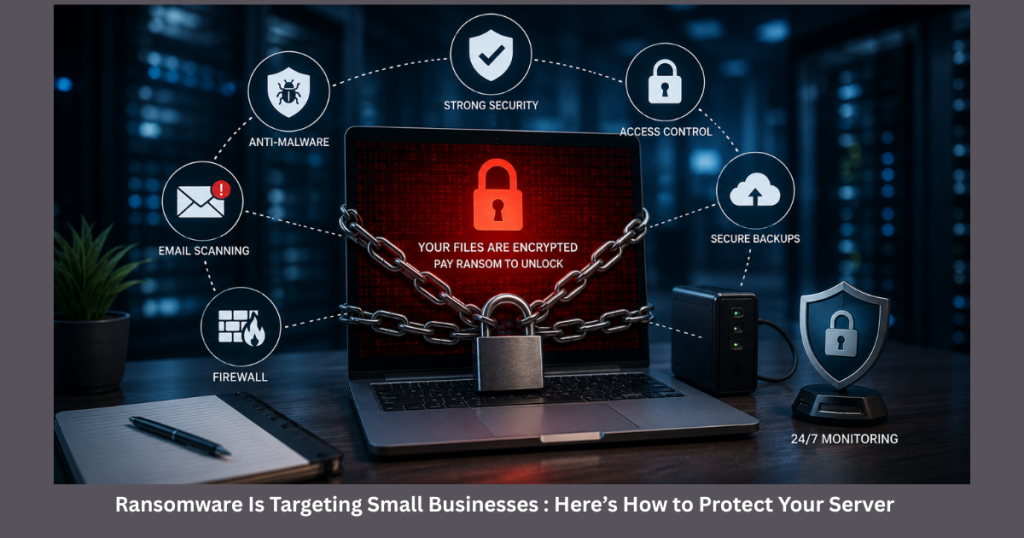
A ransomware attack can shut down your entire business in minutes. What was once considered a threat only for large enterprises is now aggressively targeting small and mid-sized businesses (SMBs).
Here’s the reality:
- 43% of cyberattacks now target small businesses
- The average ransomware demand for SMBs exceeds $200,000
- Nearly 60% of small businesses close within 6 months after a major cyberattack
If your business depends on servers, cloud infrastructure, databases, websites, or remote access systems, ransomware protection is no longer optional; it’s critical.
What Is Ransomware?
Ransomware is malicious software that encrypts your business files, applications, and server data, then demands payment to restore access.
Attackers typically gain access through:
- Phishing emails
- Weak passwords
- Exposed RDP ports
- Unpatched server vulnerabilities
- Compromised admin credentials
- Insecure third-party plugins or applications
Once inside, attackers often remain undetected for hours or days before launching encryption across your systems.
Ransomware is a type of malware that locks or encrypts files on a server or computer system and demands payment to restore access. Businesses can prevent ransomware attacks through regular patching, strong authentication, offline backups, 24×7 monitoring, and proactive server security management.
Why Ransomware Attacks on Small Businesses Are Increasing
Cybercriminals prefer targets that are easier to compromise and faster to monetize.
Large enterprises typically have:
- Dedicated SOC teams
- Advanced endpoint security
- SIEM monitoring
- Incident response teams
- Enterprise-grade firewalls
Most small businesses do not.
That makes SMBs highly attractive because attackers assume:
- Security monitoring is weak
- Backup strategies are incomplete
- MFA is missing
- Server patches are delayed
- Employees lack cybersecurity awareness
Industries Most Targeted by Ransomware
Some industries are attacked more frequently because they store valuable customer or financial data.
High-Risk Industries
| Industry | Why Attackers Target Them |
| Healthcare | Sensitive patient records |
| Law Firms | Confidential legal data |
| Retail & Ecommerce | Payment and customer data |
| Financial Services | Banking and transaction systems |
| SaaS Companies | Client infrastructure access |
| Manufacturing | Operational downtime pressure |
| Professional Services | Business-critical documentation |
Why Ransomware Protection Matters
A ransomware attack affects more than files.
Business Impact of a Ransomware Attack
Financial Damage
- Ransom payments
- Downtime losses
- Recovery expenses
- Legal costs
- Compliance penalties
Operational Damage
- Website outages
- Application downtime
- Lost productivity
- Interrupted customer services
Reputation Damage
- Loss of customer trust
- Negative media coverage
- Client churn
- Contract cancellations
Compliance Risks
Businesses handling customer data may violate:
- GDPR
- HIPAA
- PCI-DSS
- ISO 27001 requirements
How Ransomware Attacks Work
Understanding the attack lifecycle helps businesses stop ransomware before encryption begins.
Step-by-Step Ransomware Attack Process
1. Initial Access
Attackers gain entry through:
- Phishing emails
- Weak SSH or RDP passwords
- Exploited vulnerabilities
- Malware downloads
2. Privilege Escalation
The attacker attempts to gain administrator access to:
- Disable security tools
- Access backups
- Move laterally across servers
3. Data Discovery
Sensitive files and systems are identified:
- Databases
- Shared folders
- Backup locations
- Financial systems
4. Encryption Deployment
The ransomware encrypts:
- Files
- Databases
- Virtual machines
- Backups connected to the network
5. Extortion
A ransom note appears demanding payment in cryptocurrency.
10 Best Ways to Protect Your Server from Ransomware
1. Keep Servers and Software Updated
Outdated software remains the biggest ransomware entry point.
Critical Areas to Patch
- Operating systems
- Control panels
- CMS platforms
- Database servers
- Firewall firmware
- Web applications
- Plugins and extensions
Pro Tip
Enable automated security patching wherever possible and conduct monthly vulnerability assessments.
2. Use Multi-Factor Authentication (MFA)
Passwords alone are no longer enough.
Enable MFA for:
- SSH logins
- RDP access
- Cloud dashboards
- Hosting control panels
- VPN access
- Admin accounts
Why MFA Matters
Even if credentials are stolen, attackers cannot access systems without secondary verification.
3. Disable Exposed RDP Access
Remote Desktop Protocol (RDP) is one of the most exploited attack vectors.
Best Practices
- Disable public RDP exposure
- Restrict access via VPN
- Use IP whitelisting
- Change default ports
- Enable brute-force protection
4. Maintain Offline and Immutable Backups
A backup connected to your server can also get encrypted.
Follow the 3-2-1 Backup Rule
- 3 copies of your data
- 2 different storage types
- 1 offline or immutable backup
Best Backup Locations
- External encrypted storage
- Immutable cloud storage
- Air-gapped backup systems
Important
Test restoration regularly. Many businesses discover corrupted backups only during an actual incident.
5. Implement 24×7 Server Monitoring
Most ransomware attacks show warning signs before encryption starts.
Real-Time Monitoring Helps Detect:
- Suspicious login attempts
- Unusual CPU spikes
- File modification anomalies
- Malware activity
- Privilege escalation attempts
- Unauthorized processes
Why Continuous Monitoring Matters
A monitored server environment can detect and stop attacks before widespread damage occurs.
This is why businesses increasingly invest in:
- Managed server monitoring
- SIEM solutions
- Threat detection systems
- Log analysis platforms
6. Use Endpoint Detection & Response (EDR)
Traditional antivirus is no longer enough.
EDR solutions provide:
- Behavioral analysis
- Threat detection
- Automated isolation
- Real-time response
Popular EDR Platforms
- CrowdStrike
- SentinelOne
- Microsoft Defender for Endpoint
- Sophos Intercept X
7. Restrict User Permissions
Not every employee needs administrative access.
Apply the Principle of Least Privilege (PoLP)
Users should only access:
- Files they need
- Systems relevant to their role
- Limited administrative functions
Benefits
- Reduces attack spread
- Limits lateral movement
- Minimizes insider threats
8. Conduct Security Awareness Training
Human error remains one of the leading causes of ransomware infections.
Employees Should Learn How To:
- Identify phishing emails
- Avoid malicious attachments
- Detect fake login pages
- Report suspicious activity quickly
Real-World Example
Many ransomware attacks begin with a single employee clicking a malicious invoice attachment.
9. Segment Your Network
Flat networks allow ransomware to spread rapidly.
Network Segmentation Helps:
- Isolate infected systems
- Protect sensitive environments
- Reduce lateral movement
Recommended Segments
- Production servers
- Backup systems
- User workstations
- Development environments
- Financial systems
10. Create an Incident Response Plan
When ransomware strikes, every minute matters.
Your Incident Response Plan Should Include:
- Isolation procedures
- Emergency contacts
- Backup recovery workflows
- Communication protocols
- Legal and compliance steps
Key Advantage
Prepared businesses recover significantly faster than businesses improvising during an attack.
Ransomware Protection Comparison
Antivirus vs EDR vs Managed Security Monitoring
| Feature | Traditional Antivirus | EDR Solution | Managed Server Monitoring |
| Signature Detection | Yes | Yes | Yes |
| Behavioral Detection | Limited | Advanced | Advanced |
| Real-Time Monitoring | Basic | Yes | 24×7 |
| Threat Response | Minimal | Automated | Human + Automated |
| Log Analysis | No | Partial | Extensive |
| Incident Support | No | Limited | Full Support |
| Ransomware Prevention | Moderate | Strong | Very Strong |
Real-World Ransomware Example
Example: Small Ecommerce Business Attack
A small ecommerce company running outdated plugins on its Linux server experienced:
- Unauthorized admin access
- Malware deployment
- Database encryption
- Website outage for 4 days
Recovery Challenges
- Backups were connected to the same network
- No monitoring alerts existed
- RDP access lacked MFA
Result
The company lost:
- Customer trust
- Revenue
- Search engine rankings
- Operational continuity
What Could Have Prevented It?
- Security patching
- Immutable backups
- 24×7 server monitoring
- MFA implementation
Best Practices for Long-Term Server Security
Server Security Checklist
Daily
- Monitor logs
- Check failed login attempts
- Review alerts
Weekly
- Verify backups
- Scan for malware
- Audit user access
Monthly
- Patch systems
- Conduct vulnerability scans
- Test disaster recovery plans
Quarterly
- Perform penetration testing
- Review firewall policies
- Update incident response plans
Emerging Ransomware Trends in 2026
Cybercriminal tactics continue evolving rapidly.
Major Trends Businesses Must Watch
AI-Powered Phishing
Attackers now use AI-generated emails that appear highly legitimate.
Double Extortion
Attackers encrypt files and threaten to leak stolen data publicly.
Supply Chain Attacks
Hackers compromise vendors and third-party tools to access businesses indirectly.
Cloud Ransomware
Cloud servers and SaaS platforms are increasingly targeted.
Ransomware-as-a-Service (RaaS)
Criminal groups now sell ransomware kits to less-skilled attackers.
Future of Ransomware Protection
Modern cybersecurity is shifting from reactive defense to proactive detection.
Future Security Strategies Include:
- AI-powered threat detection
- Zero Trust Architecture
- Automated incident response
- Advanced behavioral analytics
- Continuous vulnerability management
Businesses that adopt proactive security models will significantly reduce ransomware risks.
What to Do Immediately After a Ransomware Attack
First 5 Critical Steps
1. Disconnect the infected server
Prevent ransomware from spreading.
2. Do not pay immediately
Paying does not guarantee recovery.
3. Contact cybersecurity professionals
Expert response reduces damage.
4. Check backup integrity
Verify clean recovery points.
5. Report the incident
Notify legal authorities and compliance teams if necessary.
Final Verdict
Ransomware is no longer a rare cybersecurity event affecting only large enterprises. Small businesses are now among the most frequent and vulnerable targets.
The businesses that survive ransomware attacks are not necessarily the largest; they are the most prepared.
Proactive server monitoring, secure backups, access control, patch management, and rapid threat detection can prevent catastrophic downtime and financial loss.
If your business relies on servers, cloud infrastructure, or online applications, ransomware prevention should be treated as a business continuity priority not just an IT task.
Protect Your Business Before an Attack Happens
Downtime, encrypted files, and lost customer trust can cost far more than proactive protection.
Our team provides:
- 24×7 server monitoring
- Security hardening
- Threat detection
- Patch management
- Backup monitoring
- Disaster recovery support
We help businesses detect threats early and keep servers secure around the clock. Get a free server security assessment and discover vulnerabilities before attackers do.
Frequently Asked Questions
Ransomware is malware that locks or encrypts your files and demands payment to restore access. Yes, but recovery depends heavily on backup quality, monitoring, and incident response preparedness. Critical business backups should ideally be tested monthly to ensure successful restoration. Security experts generally advise against paying because there is no guarantee files will be restored. No. Modern ransomware often bypasses traditional antivirus solutions. Businesses need layered security and proactive monitoring.1.What is ransomware in simple terms?
2.Can small businesses recover from ransomware attacks?
3.How often should backups be tested?
4.Should businesses pay ransomware attackers?
5.Is antivirus enough to stop ransomware?