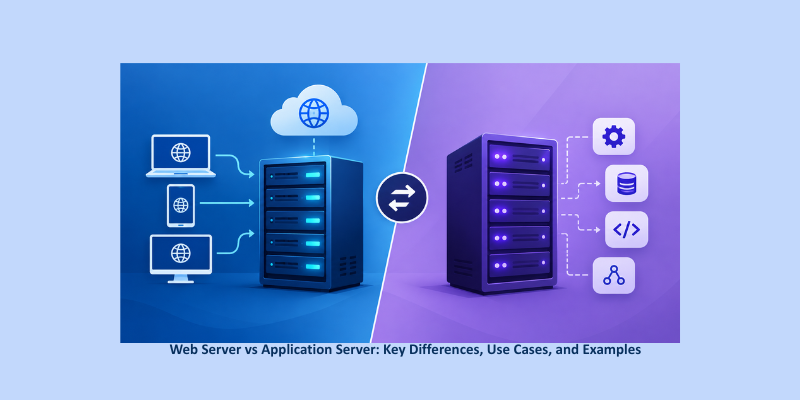
Web Server vs Application Server: A web server primarily delivers static content such as HTML, CSS, images, and JavaScript, while an application server executes business logic, processes dynamic requests, interacts with databases, and generates customized responses.In modern IT infrastructure, both typically work together to deliver secure, scalable, and high-performance web applications.
If you’ve spent any time managing websites, applications, or cloud infrastructure, you’ve likely encountered the terms Web Server and Application Server. While they are often used interchangeably, they serve distinct purposes within an application architecture. Understanding the difference between a Web Server vs Application Server is essential for developers, system administrators, and organizations looking to build reliable and scalable systems.
Quick Comparison: Web Server vs Application Server
| Feature | Web Server | Application Server |
| Primary Purpose | Serve static content | Execute business logic |
| Content Type | HTML, CSS, JS, Images | Dynamic content |
| Database Access | Typically No | Yes |
| Session Management | Limited | Advanced |
| Performance Focus | Fast content delivery | Application processing |
| Examples | Nginx, Apache, LiteSpeed | Tomcat, JBoss, Node.js, Gunicorn |
| State Management | Usually stateless | Often stateful |
What Is a Web Server?
A Web Server is software that receives HTTP/HTTPS requests from users and delivers static content back to the browser. Its primary role is to efficiently serve files such as HTML pages, CSS stylesheets, JavaScript files, images, and videos.
A web server is optimized for speed and can handle thousands of concurrent connections with minimal resource consumption.
Key Functions of a Web Server
- Serving static content
- SSL/TLS termination
- Reverse proxying
- Load balancing
- URL routing
- Asset caching
- Gzip/Brotli compression
Popular Web Server Examples
- Nginx
- Apache HTTP Server
- LiteSpeed
- Caddy
According to industry web server usage reports, Nginx and Apache continue to power a significant percentage of websites worldwide, making them among the most widely adopted web server technologies.
What Is an Application Server?
An Application Server executes business logic and generates dynamic responses based on user requests. Instead of simply returning files, it processes requests, interacts with databases, performs calculations, manages sessions, and returns customized content.
Application servers provide the runtime environment required for enterprise applications and APIs.
Key Functions of an Application Server
- Executing application code
- Business logic processing
- Database connectivity
- Session management
- Authentication and authorization
- Transaction handling
- Middleware services
- API request processing
Popular Application Server Examples
- Apache Tomcat
- JBoss / WildFly
- Gunicorn
- uWSGI
- Node.js
- ASP.NET Core Kestrel
Many enterprise applications rely on Application Servers to manage complex workloads and business processes.
Web Server vs Application Server: Key Differences
Understanding the difference between a Web Server and an Application Server helps organizations design more efficient architectures.
1. Purpose
A Web Server focuses on delivering content quickly, while an Application Server focuses on processing requests and executing application logic.
2. Content Delivery
Web servers deliver static resources, whereas application servers generate dynamic responses based on user interactions.
3. Database Interaction
Web servers generally do not communicate directly with databases. Application servers routinely query databases and process data.
4. Resource Consumption
Web servers are lightweight and optimized for high concurrency. Application servers consume more resources because they perform computational tasks.
5. Session Management
Application servers provide advanced session handling and user state management, while web servers are typically stateless.
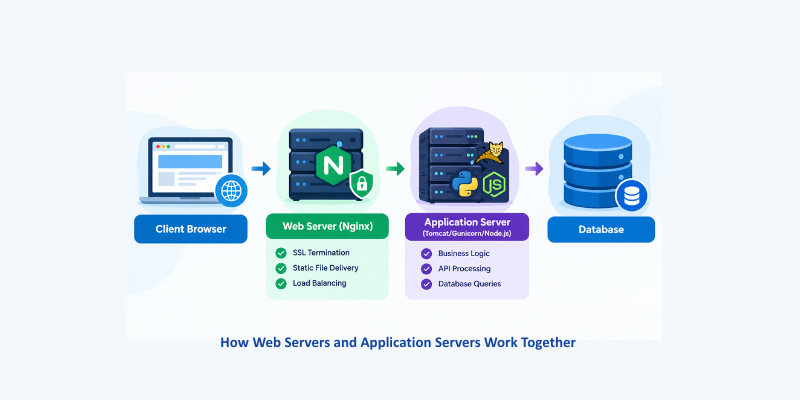
How Web Servers and Application Servers Work Together
In production environments, organizations rarely use just one server type. Instead, both work together in a layered architecture.
Why This Architecture Is Common
- Faster content delivery
- Reduced load on application servers
- Improved scalability
- Better security
- Efficient SSL management
- High availability and redundancy
This architecture is widely adopted in modern Server Management environments.
When Should You Use a Web Server?
A Web Server is ideal for:
- Hosting static websites
- Delivering media files
- SSL/TLS termination
- Reverse proxying
- Load balancing
- Content caching
- High-traffic websites
Organizations offering IT Managed Services frequently deploy Nginx or Apache as the front-end layer to optimize performance.
When Should You Use an Application Server?
An Application Server is necessary when your application requires:
- Business logic execution
- Database interactions
- User authentication
- Session management
- API development
- Enterprise application hosting
Examples include eCommerce platforms, SaaS applications, ERP systems, and financial applications.
Web Server and Application Server in Cloud Environments
As businesses move toward cloud-native architectures, both Web Servers and Application Servers continue to play critical roles.
AWS and Azure Deployments
In cloud environments such as AWS and Azure:
- Nginx or Apache often act as reverse proxies.
- Application servers such as Tomcat, Node.js, or Gunicorn process backend requests.
- Load balancers distribute traffic across multiple instances.
- Auto-scaling ensures application availability during traffic spikes.
Kubernetes and Containerized Applications
In Kubernetes environments:
- An Ingress Controller (commonly Nginx-based) functions as the web server layer.
- Application containers run backend services and business logic.
- Kubernetes manages scaling, failover, and workload distribution.
This separation improves performance, scalability, and operational efficiency.
Practical Example: Nginx vs Tomcat
A common Nginx vs Tomcat deployment follows this workflow:
- The user sends an HTTPS request.
- Nginx receives the request.
- Static content is served directly by Nginx.
- Dynamic requests are forwarded to Tomcat.
- Tomcat executes Java application code.
- Tomcat communicates with the database.
- The response is sent back through Nginx to the user.
This approach combines the speed of a web server with the processing capabilities of an application server.
Server Management Best Practices
Effective Server Management ensures both server types operate efficiently.
Separate Server Layers
Deploy web servers and application servers independently whenever possible.
Enable Caching
Use caching mechanisms to reduce backend processing and improve response times.
Monitor Performance
Track CPU, memory, network utilization, and application health.
Implement Load Balancing
Distribute workloads across multiple servers to improve availability.
Strengthen Security
- Enable SSL/TLS
- Configure firewalls
- Apply regular updates
- Implement access controls
Optimize Database Connectivity
Use connection pooling and query optimization to reduce application latency.
Final Verdict
The difference between a Web Server vs Application Server comes down to their core responsibilities. A Web Server is optimized for delivering static content and handling HTTP-related tasks, while an Application Server executes business logic, manages sessions, and interacts with databases.
Most modern applications use both technologies together, creating a scalable and efficient architecture. Whether you’re comparing Apache vs Tomcat, evaluating Nginx vs Tomcat, or planning enterprise infrastructure, understanding how these servers work together is essential for effective Server Management and successful IT Managed Services deployments.
Need reliable Web & Application Server Management? Let our experts optimize, secure, and monitor your infrastructure 24×7.
Get professional Server Management Services today and keep your applications secure, stable, and performing at their best.
Frequently Asked Questions
A web server primarily serves static content such as HTML, CSS, JavaScript, and images, while an application server executes business logic, processes dynamic requests, manages sessions, and communicates with databases. In modern architectures, a web server and application server often work together. No. Nginx cannot directly replace Tomcat when an application requires a Java application runtime. Nginx is primarily a web server and reverse proxy, while Tomcat runs Java-based web applications. A common architecture uses Nginx as a reverse proxy for Tomcat to handle SSL termination, static content, and traffic routing. Apache HTTP Server is a web server, not a traditional application server. It is primarily used to serve web content, handle HTTP requests, provide SSL/TLS termination, and act as a reverse proxy. Application servers such as Tomcat handle application-level processing. You may need both depending on your application architecture. A web server and application server are commonly used together when an application needs static content delivery, SSL termination, reverse proxying, business logic processing, and database connectivity. Simple applications may operate with only one server component. Nginx and Tomcat are designed for different purposes, so comparing their speed directly is not meaningful. Nginx is optimized for high-performance HTTP traffic, static content, reverse proxying, and load balancing, while Tomcat is designed to execute Java web applications and process dynamic requests. In many production environments, Nginx and Tomcat work together rather than replacing one another.1. What is the difference between a web server and an application server?
2. Can Nginx replace Tomcat?
3. Is Apache a web server or application server?
4. Do I need both a web server and an application server?
5. Which is faster: Nginx or Tomcat?