Summary
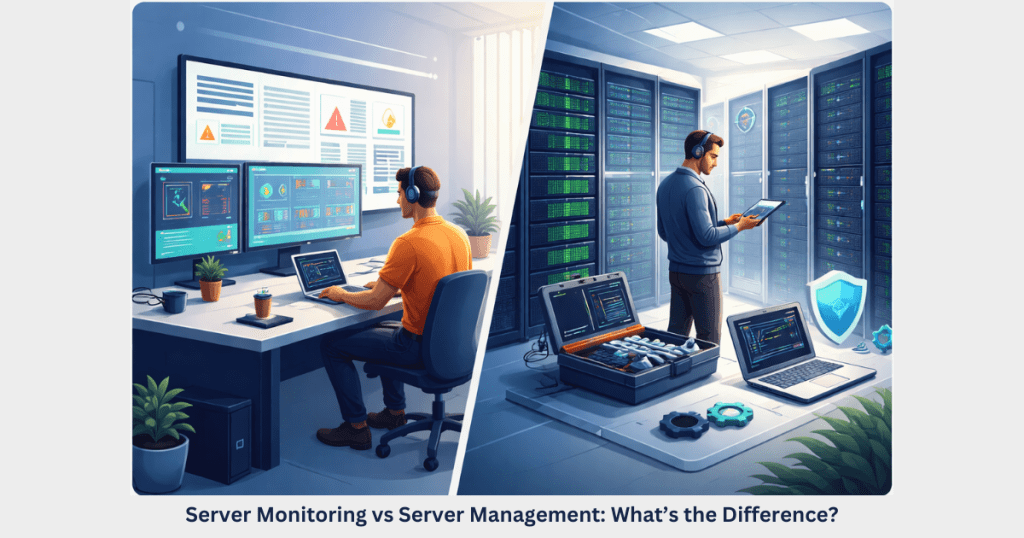
Understanding the difference between server monitoring vs server management is essential for maintaining a reliable and secure IT infrastructure. Server monitoring focuses on tracking server performance, uptime, and system metrics to detect issues in real time. In contrast, server management involves the ongoing maintenance, configuration, security updates, optimization, and troubleshooting required to keep servers running smoothly.
While monitoring helps identify potential problems, server management ensures those issues are resolved and prevented in the future. Businesses that combine 24/7 server monitoring with professional server management services benefit from improved uptime, stronger security, and better overall server performance. This integrated approach allows organizations to focus on their core operations while experts manage and protect their server infrastructure.
Introduction
In today’s digital landscape, servers power everything—from business websites and SaaS applications to cloud platforms and databases. A server outage or performance issue can quickly affect business operations, revenue, and customer trust.
Because of this, many businesses invest in server monitoring services and server management services. However, these two terms are often confused or used interchangeably.
Understanding the difference between server monitoring vs server management is essential for organizations that want reliable, secure, and high-performing IT infrastructure.
In this guide, we’ll explain what each service includes, how they differ, and why combining both can provide the best results for your business.
What Is Server Monitoring?
Server monitoring refers to the continuous tracking of a server’s health, performance, and availability. It focuses on detecting problems early by analyzing various metrics in real time.
Organizations rely on 24/7 server monitoring to ensure their infrastructure stays online and performs optimally.
Key Functions of Server Monitoring
A typical server monitoring service tracks several important metrics, including:
- CPU utilization
- Memory usage
- Disk space and I/O activity
- Network traffic
- Server uptime and availability
- Application performance
- Database response time
Monitoring systems automatically generate alerts whenever thresholds are exceeded or anomalies are detected.
For example:
- A spike in CPU usage could indicate a resource-heavy process.
- Low disk space could lead to application failures.
- Network latency could affect application performance.
With real-time server monitoring, administrators can quickly identify issues before they escalate into major outages.
Benefits of Server Monitoring
Implementing proactive server monitoring offers several advantages:
1. Early Detection of Problems
Monitoring tools detect performance issues before they impact users.
2. Reduced Downtime
Alerts allow teams to respond quickly to outages or service disruptions.
3. Improved Performance Visibility
Administrators gain insight into server health and system behavior.
4. Capacity Planning
Historical data helps organizations plan upgrades and optimize resource allocation.
5. Security Awareness
Monitoring can detect suspicious activity such as abnormal traffic spikes or unauthorized login attempts.
Despite these benefits, monitoring alone does not solve problems—it only identifies them.
What Is Server Management?
Server management is a broader service that includes the administration, maintenance, optimization, and security of servers.
While monitoring identifies issues, server management services ensure that servers are properly configured, maintained, and continuously optimized.
Businesses that lack in-house system administrators often rely on managed server services to handle these responsibilities.
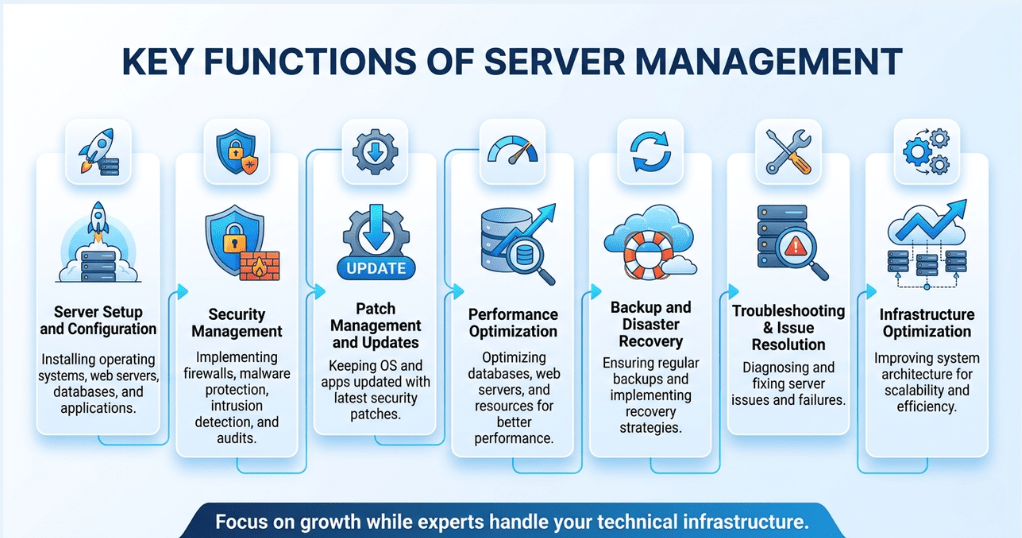
Key Functions of Server Management
A comprehensive server management solution typically includes:
Server Setup and Configuration
Installing and configuring operating systems, web servers, databases, and applications.
Security Management
Implementing firewall rules, malware protection, intrusion detection, and regular security audits.
Patch Management and Updates
Keeping operating systems and applications updated with the latest patches.
Performance Optimization
Optimizing databases, web servers, and system resources to improve performance.
Backup and Disaster Recovery
Ensuring regular backups and implementing disaster recovery strategies.
Troubleshooting and Issue Resolution
Diagnosing and fixing server issues when alerts or failures occur.
Infrastructure Optimization
Improving system architecture for scalability and efficiency.
With professional server management, businesses can focus on growth while experts handle the technical infrastructure.
Server Monitoring vs Server Management: Key Differences
Although both services support server reliability, their roles are different.
| Feature | Server Monitoring | Server Management |
| Primary Focus | Observing server performance | Managing and maintaining servers |
| Role | Detect problems | Fix and prevent problems |
| Activities | Alerts, metrics tracking | Configuration, updates, optimization |
| Scope | Limited to monitoring tools | Comprehensive infrastructure management |
| Response | Notifies administrators | Takes action to resolve issues |
In simple terms:
Server monitoring identifies issues, while server management resolves and prevents them.
Both are essential components of a reliable IT infrastructure.
When Do Businesses Need Server Monitoring?
Some organizations choose standalone server monitoring solutions when they already have an in-house IT team.
Common scenarios include:
1. Internal IT Teams
Companies with experienced administrators who can respond to alerts.
2. DevOps Teams
Organizations running complex CI/CD pipelines that require performance insights.
3. Large Enterprises
Enterprises often use monitoring tools alongside internal management teams.
4. Performance Tracking
Businesses that want detailed analytics about server health and application performance.
In these cases, monitoring tools act as an early warning system for system administrators.
When Do Businesses Need Server Management?
Many companies lack the resources or expertise to manage infrastructure internally. For them, outsourced server management services are often the best solution.
Businesses that benefit from server management include:
- Startups without dedicated DevOps engineers
- SaaS companies running production infrastructure
- E-commerce platforms requiring high uptime
- Hosting companies managing multiple servers
- Businesses using cloud infrastructure like AWS, Azure, or Google Cloud
With managed server support, experts handle everything from security patches to performance tuning.
This reduces operational risk and ensures stable infrastructure.
Why Monitoring Alone Is Not Enough
While server monitoring services provide valuable insights, they cannot resolve issues automatically.
For example:
Monitoring tools can detect:
- High CPU usage
- Disk space shortages
- Database performance issues
- Security anomalies
But they cannot:
- Optimize configurations
- Patch vulnerabilities
- Restart failed services
- Fix software conflicts
- Improve system architecture
Without server administration expertise, alerts may remain unresolved for hours or even days.
That is why businesses increasingly adopt fully managed server services.
The Importance of 24/7 Monitoring and Management
Modern applications operate around the clock. Even a short outage can disrupt operations or lead to financial loss.
Combining 24/7 server monitoring with professional server management services ensures continuous protection.
Key benefits include:
Continuous Infrastructure Oversight
Servers are monitored every minute for performance or security issues.
Rapid Incident Response
Experts respond to alerts immediately to minimize downtime.
Improved System Stability
Regular optimization and maintenance improve overall performance.
Enhanced Security
Proactive patching and security monitoring reduce vulnerabilities.
Business Continuity
Backup and disaster recovery strategies protect critical data.
For mission-critical systems, relying on both monitoring and management is essential.
How Managed Server Providers Deliver Both Services
Professional infrastructure providers typically combine monitoring and management into a single solution.
For example, a managed server provider may deliver:
- Real-time server monitoring
- Automated alerting
- Security patch management
- Server hardening
- Performance optimization
- Backup management
- Incident response and troubleshooting
This approach ensures that servers remain stable, secure, and optimized at all times.
Businesses no longer need to worry about unexpected downtime or technical complexities.
Choosing the Right Server Management Partner
Selecting the right provider for managed server services can significantly impact infrastructure performance.
Here are a few factors to consider:
Experience and Expertise
Look for providers with strong experience in Linux server management, cloud server management, and DevOps infrastructure.
24/7 Technical Support
Round-the-clock monitoring and support are essential for mission-critical systems.
Security Practices
The provider should implement strict security measures and regular vulnerability assessments.
Scalability
Choose a partner capable of supporting infrastructure growth and future requirements.
Transparent Communication
Clear reporting and response protocols ensure better collaboration.
Working with the right partner ensures reliable and efficient server operations.
How 24×7 Server Management Helps Businesses
At 24×7 Server Management, we provide comprehensive server monitoring and management services designed to keep your infrastructure secure, optimized, and highly available.
Our services include:
- 24/7 server monitoring and alerting
- Linux server management
- Cloud infrastructure management
- Server performance optimization
- Security patching and hardening
- Backup and disaster recovery
- Proactive troubleshooting and incident response
With a team of experienced engineers, we help businesses maintain stable and secure server environments without the complexity of managing infrastructure internally.
Final Thoughts
Understanding the difference between server monitoring vs server management is essential for businesses that depend on reliable IT infrastructure.
While server monitoring focuses on detecting issues through real-time alerts and performance tracking, server management ensures those issues are resolved and prevented through proactive maintenance, optimization, and security practices.
Organizations that rely solely on monitoring tools may still face operational risks if alerts are not handled promptly. Combining proactive monitoring with expert server management services provides the best protection against downtime, performance issues, and security threats.
As businesses continue to rely on cloud platforms, applications, and digital services, investing in reliable server monitoring and management solutions becomes critical for long-term success.
Call To Action
Stop worrying about server downtime.
Our experts provide 24/7 server monitoring and full server management to keep your infrastructure secure and optimized.
Get started today with professional server management.
Frequently Asked Questions:
Server monitoring tracks server performance, uptime, and system metrics to detect issues. Server management involves maintaining, configuring, securing, and optimizing servers to ensure stable and reliable operations. Server monitoring helps detect performance issues, resource shortages, and potential outages early. It allows IT teams to respond quickly and prevent downtime or service disruption. Server management services include server setup, configuration, security patching, performance optimization, backups, troubleshooting, and ongoing infrastructure maintenance. Yes, but monitoring only detects issues. Without server management, problems may not be resolved quickly, which can lead to downtime, security vulnerabilities, or performance degradation. Businesses use managed server services to ensure reliable infrastructure, reduce downtime, improve security, and allow internal teams to focus on core business operations instead of server maintenance.1. What is the difference between server monitoring and server management?
2. Why is server monitoring important?
3. What does server management include?
4. Can server monitoring work without server management?
5. Why do businesses use managed server services?