Artificial intelligence has moved from experimental projects to mission-critical enterprise platforms. Generative AI, large language models (LLMs), AI-powered analytics, and autonomous business applications now demand infrastructure that can scale far beyond traditional web and database environments.
The challenge is no longer whether to adopt AI, but how to build an infrastructure capable of supporting GPU-intensive workloads reliably, securely, and cost-effectively.
This guide explains How to Prepare Infrastructure for AI Workloads and outlines the architectural decisions required for enterprise-scale GPU adoption.
Why Traditional Infrastructure Fails for AI
Conventional virtualized environments were designed for CPU-bound applications. AI workloads are fundamentally different:
- Massive parallel computation
- Multi-terabyte datasets
- High-throughput storage requirements
- Low-latency GPU-to-GPU communication
- Rapid scaling during model training
As organizations move toward Infrastructure for Generative AI, they quickly discover that simply adding a few GPUs to existing servers is not enough.
Typical AI workload bottlenecks
| Infrastructure Layer | Traditional Setup | AI Requirement |
| Compute | CPU virtualization | Multi-GPU acceleration |
| Storage | SATA/NAS | NVMe parallel storage |
| Networking | 1–10 GbE | 100–400 GbE / InfiniBand |
| Orchestration | VM management | Kubernetes GPU scheduling |
| Monitoring | CPU/RAM metrics | GPU telemetry & AI observability |
This is why enterprises are investing in AI Infrastructure for AI Workloads rather than extending legacy infrastructure.
The 5-Layer AI Infrastructure Stack
A practical way to think about AI Compute Infrastructure is as a five-layer stack.
Enterprise AI infrastructure stack
Reference architecture
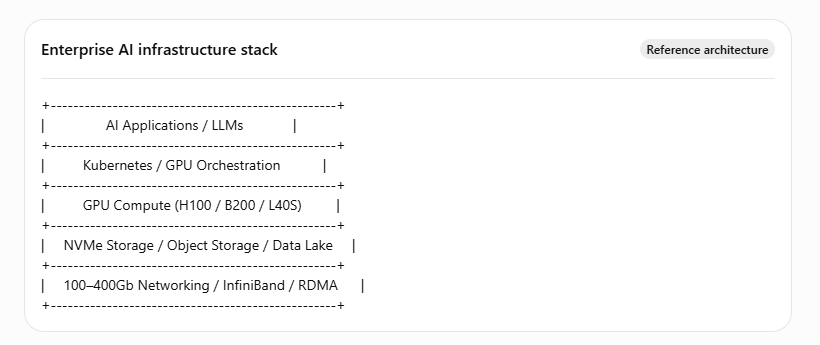
Each layer must scale independently, otherwise GPU investments become underutilized.
Step 1: Assess Your AI Workload Type
Before purchasing hardware, classify the workload.
| Workload Type | Primary Requirement |
| LLM training | Maximum GPU memory and interconnect bandwidth |
| Fine-tuning | Moderate GPU clusters and fast storage |
| Inference APIs | Scalable GPU serving and autoscaling |
| Computer vision | High-throughput data pipelines |
| AI analytics | Balanced CPU/GPU architecture |
This assessment determines whether you need a dedicated AI Model Training Infrastructure or a lighter inference-focused environment.
Step 2: Design GPU Infrastructure for Scale
A common mistake is deploying isolated GPU servers. Modern GPU Infrastructure for AI Workloads should be designed as a cluster from day one.
Recommended enterprise starting point
- 4–8 GPUs per node
- NVIDIA H100, B200, or L40S class GPUs
- PCIe Gen5 or NVLink connectivity
- 512 GB–2 TB system RAM
- Dual 100/200 GbE networking
- NVMe local scratch storage
Why clustering matters
Large AI models often require multiple GPUs simultaneously. Without high-speed interconnects, training time increases dramatically.
Think of GPUs as a team: if they cannot communicate quickly, adding more GPUs produces diminishing returns.
Step 3: Build Kubernetes-Native AI Infrastructure
In 2026, Kubernetes for AI Workloads will become the de facto orchestration layer for enterprise AI platforms.
Core Kubernetes GPU components
- NVIDIA GPU Operator
- Device Plugin
- Node Feature Discovery
- Kueue or Volcano for batch scheduling
- Prometheus + DCGM Exporter
Kubernetes AI workflow
Kubernetes GPU workflow – Enterprise Pattern
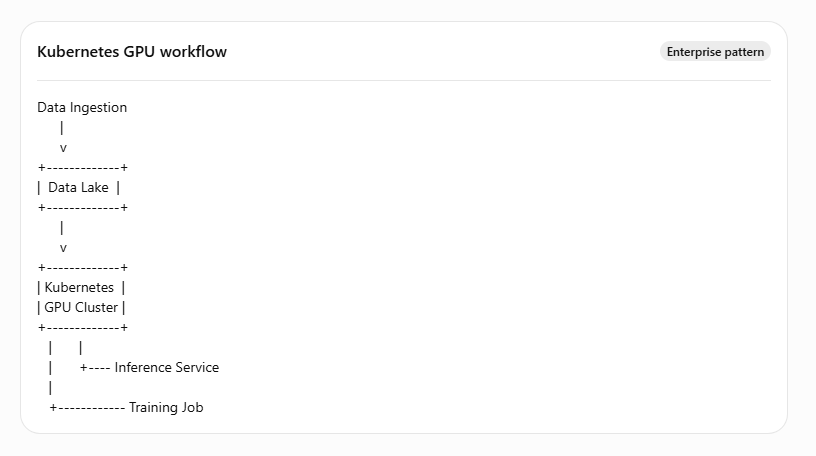
This approach enables resource sharing, autoscaling, and workload isolation across teams.
For organizations lacking internal Kubernetes expertise, Managed GPU Infrastructure services can significantly reduce operational complexity.
Step 4: Fix Storage Before GPUs Become Idle
Storage is one of the most overlooked parts of AI Infrastructure Scaling Best Practices.
A cluster of eight H100 GPUs can consume data faster than many enterprise NAS systems can deliver it.
Recommended storage architecture
| Storage Tier | Purpose |
| NVMe local | Training scratch space |
| Distributed NVMe | Active datasets |
| Object storage | Model artifacts & checkpoints |
| Cold storage | Archived datasets |
Target throughput
- Single GPU node: 5–10 GB/s
- 8-GPU node: 20–40 GB/s
- Multi-node cluster: 100+ GB/s aggregate
If GPUs are waiting for data, they are effectively wasted capital.
Step 5: Upgrade Networking for Distributed AI
Networking becomes critical once workloads span multiple GPU nodes.
Minimum recommendations
| Cluster Size | Recommended Network |
| 1 node | 25 GbE |
| 2–4 nodes | 100 GbE |
| 4–16 nodes | 200 GbE + RDMA |
| 16+ nodes | 400 GbE / InfiniBand |
AI networking priorities
- Low latency
- High bandwidth
- RDMA support
- GPU Direct capability
- Non-blocking fabric design
These are essential for distributed training and large-scale AI Compute Infrastructure deployments.
Step 6: Build an AI-Ready Monitoring and Observability Strategy
Deploying GPUs is only the beginning. Maintaining consistent performance across AI environments requires deep visibility into infrastructure health. Traditional monitoring tools that focus only on CPU, memory, and disk usage cannot provide the insights needed for AI workloads.
A modern AI Compute Infrastructure should include comprehensive observability that tracks GPU performance, storage throughput, networking, and Kubernetes workloads in real time.
Key metrics to monitor
- GPU utilization and memory consumption
- GPU temperature and power usage
- Training job duration
- Model inference latency
- Storage IOPS and throughput
- Network latency between GPU nodes
- Kubernetes pod health and resource allocation
By integrating tools such as Prometheus, Grafana, NVIDIA DCGM Exporter, and OpenTelemetry, enterprises can proactively identify performance bottlenecks before they impact AI applications.
AI Infrastructure Monitoring Architecture
AI Applications
│
▼
Kubernetes Cluster
│
┌───────────────┼───────────────┐
▼ ▼ ▼
GPU Metrics Node Metrics Storage Metrics
│ │ │
└───────────────┼───────────────┘
▼
Prometheus Server
│
▼
Grafana Dashboard
│
▼
Alerts & Auto Remediation
This approach improves infrastructure visibility and supports proactive maintenance, enabling IT teams to maintain high availability for AI workloads.
Step 7: Secure Your AI Infrastructure
As AI adoption increases, so do cybersecurity risks. AI environments often process proprietary business data, customer information, and sensitive intellectual property. A secure Infrastructure for Generative AI should follow a zero-trust security model.
Step 8: Optimize Costs Without Sacrificing Performance
GPU infrastructure represents one of the largest investments in an enterprise AI strategy. Without proper planning, organizations often experience low GPU utilization, resulting in unnecessary operational costs.
Implementing AI Infrastructure Scaling Best Practices helps maximize return on investment while maintaining performance.
Cost Optimization Strategies
Right-size GPU Resources
Not every workload requires high-end GPUs. Match GPU types to workload requirements.
Autoscale GPU Nodes
Scale infrastructure automatically during peak demand and reduce resources during idle periods.
Schedule Training Jobs
Run resource-intensive AI training during off-peak hours to improve infrastructure efficiency.
Share GPU Resources
Leverage Kubernetes scheduling to allocate GPU resources across multiple development teams.
Monitor Utilization
Track GPU usage continuously to identify idle or underutilized resources.
Organizations that actively monitor GPU utilization often achieve significant improvements in infrastructure efficiency and lower operational costs.
Key Takeaways
- AI Infrastructure for AI Workloads requires compute, storage, networking, and orchestration to scale together.
- GPU Infrastructure for AI Workloads should be designed as a cluster, not isolated servers.
- Kubernetes for AI Workloads is now the standard orchestration layer for enterprise AI.
- Fast NVMe storage and high-bandwidth networking are often more important than adding extra GPUs.
- AI Infrastructure Scaling Best Practices focus on utilization, automation, and observability.
- Organizations without in-house GPU expertise should consider Managed GPU Infrastructure to accelerate deployment and reduce operational risk.
AI Infrastructure Readiness Checklist
Before launching enterprise AI projects, ensure your organization can answer “Yes” to the following questions.
✅ Have you identified your AI workload requirements?
✅ Is your GPU Infrastructure for AI Workloads designed for future growth?
✅ Do you have high-performance NVMe storage?
✅ Is your network capable of supporting distributed GPU communication?
✅ Are you using Kubernetes for AI Workloads?
✅ Is GPU monitoring implemented?
✅ Are security policies protecting AI models and datasets?
✅ Is disaster recovery included in your AI infrastructure strategy?
✅ Can your infrastructure scale without service disruption?
If any of these areas require improvement, addressing them before deployment will significantly reduce operational challenges as AI adoption grows.
Final Verdict
Artificial intelligence is transforming how enterprises innovate, compete, and deliver value. However, successful AI initiatives require much more than powerful GPUs they demand a scalable, resilient, and secure infrastructure designed specifically for AI workloads.
Building AI Infrastructure for AI Workloads involves careful planning across compute, storage, networking, orchestration, and security. Organizations that adopt AI Infrastructure Scaling Best Practices, implement Managed GPU Infrastructure, and leverage Kubernetes for AI Workloads are better positioned to accelerate AI adoption while controlling costs and maintaining operational excellence.
Whether you’re training large language models, deploying AI-powered applications, or building the next generation of intelligent services, investing in a future-ready AI Model Training Infrastructure today will provide the flexibility and performance needed for tomorrow’s AI innovations.
Ready to Build an AI-Ready Infrastructure?
At Geeks Solutions, we help enterprises design, deploy, and manage high-performance AI infrastructure tailored to modern business needs. From GPU Infrastructure for AI Workloads and Kubernetes clusters to cloud architecture, DevOps automation, and 24×7 infrastructure management, our experts ensure your AI platform is secure, scalable, and optimized for growth.
Frequently Asked Questions
Preparing infrastructure for AI workloads involves building a scalable platform with high-performance GPUs, fast NVMe storage, low-latency networking, Kubernetes orchestration, and comprehensive monitoring. Organizations should assess workload requirements, implement GPU Infrastructure for AI Workloads, and follow AI infrastructure scaling best practices to ensure reliability and performance. The best AI Model Training Infrastructure combines GPU-accelerated servers, NVMe storage, high-speed networking (100–400 GbE or InfiniBand), Kubernetes orchestration, and AI monitoring tools. This architecture enables faster model training, improved scalability, and efficient resource utilization for enterprise AI projects. Kubernetes for AI Workloads automates container deployment, GPU scheduling, autoscaling, and workload management across multiple GPU nodes. It helps enterprises efficiently share GPU resources, improve application availability, and simplify AI infrastructure management. The most effective AI Infrastructure Scaling Best Practices include deploying GPU clusters instead of standalone servers, using high-performance NVMe storage, implementing Kubernetes orchestration, monitoring GPU utilization, securing AI workloads with Zero Trust principles, and automating infrastructure scaling based on demand. The choice between cloud and on-premises GPU Infrastructure for AI Workloads depends on workload size, compliance requirements, and budget. Cloud infrastructure offers flexibility and rapid scalability, while on-premises deployments provide greater control, predictable long-term costs, and enhanced data security. Many enterprises adopt a hybrid model to balance performance and scalability.1. How do you prepare infrastructure for AI workloads?
2. What is the best infrastructure for AI model training?
3. Why is Kubernetes important for AI workloads?
4. What are the best AI infrastructure scaling practices for enterprises?
5. Should businesses choose cloud or on-premises GPU infrastructure for AI workloads?