A Docker build can work perfectly for weeks and then fail without a single application-code change. One of the most common reasons is a Personal Access Token (PAT) used to access a private Git repository reaching its expiration date or being revoked.
Git clone exit code 128 in Docker generally indicates that Git could not successfully complete the clone operation. When a private Python dependency is installed through Git, an authentication failure can cause the entire pip install layer and therefore the Docker build—to fail.
Why Does Git Clone Exit Code 128 Happen in Docker?
A common setup looks like this:
requirements.txt
│
▼
pip install -r requirements.txt
│
▼
Git-based Python dependency
│
▼
git clone https://…@dev.azure.com/…
│
▼
Private Repository
For example, a Python application may contain a dependency such as:
git+https://x-access-token:<PAT>@dev.azure.com/your-org/your-project/_git/your-private-package
When pip reaches this dependency, it invokes Git to retrieve the repository. If the credential is invalid, Git cannot authenticate, and the installation process terminates.
The result can look like:
error: subprocess-exited-with-error
× git clone –filter=blob:none –quiet \
‘https://****@dev.azure.com/…/_git/your-private-package’
exit code: 128
This is why a Docker build git clone authentication failed error can initially look like a Docker or Python problem when the actual failure is repository authentication.
The Most Common Cause: An Expired PAT
One of the first things to investigate is the token used by the build pipeline.
Azure DevOps allows PATs to have an expiration date, with user-created PATs currently limited to a maximum of one year. Microsoft also states that users receive an expiration notification one week before a PAT expires.
That creates a common production scenario:
- The application code has not changed.
- The Dockerfile has not changed.
- The dependency URL has not changed.
- The CI/CD pipeline configuration has not changed.
- The PAT has expired or been revoked.
The build suddenly starts failing.
This is a classic Git clone exit code 128 Azure DevOps PAT troubleshooting scenario.
How It Works: From pip to Git Authentication
Understanding the request path makes troubleshooting considerably easier.
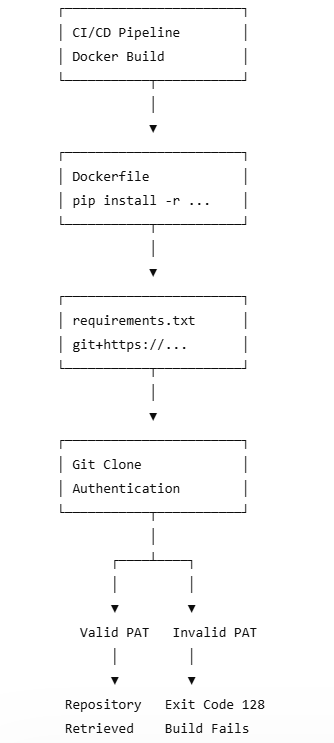
This explains why the failure may appear at:
pip install -r requirements.txt
even though the underlying problem is actually private Git repository authentication in Docker.
How to Diagnose the Problem
Before replacing credentials, confirm that authentication is actually the problem.
1. Inspect the Git Error
Look for:
exit code: 128
Then inspect the surrounding Git output. Authentication-related errors may mention authorization, credentials, repository access, or inability to read from the remote repository.
Exit code 128 is not exclusively an authentication code, so don’t treat it as absolute proof. A repository URL change, permissions issue, network restriction, or inaccessible repository can produce a similar failure.
2. Check the Repository URL
Look at the masked URL in the CI/CD logs.
For example:
https://****@dev.azure.com/company/project/_git/private-package
Verify:
- Organization name
- Project name
- Repository name
- Protocol
- Repository path
- Authentication method
A renamed or moved repository can produce a failure that looks similar to a credential problem.
3. Check the PAT
For an Azure DevOps private repository Docker build, verify:
- Is the PAT expired?
- Was it revoked?
- Does it still have repository read permission?
- Has an organization security policy changed?
- Was the account that created the token disabled or changed?
Azure DevOps also provides administrative controls for restricting PAT scope and maximum lifetime, so organization-level policy changes can affect previously working authentication patterns.
Fixing the Immediate Problem
If the investigation confirms that the PAT is invalid, generate or retrieve a valid credential with only the permissions required by the build.
Then update the authentication mechanism used by the pipeline.
If the repository dependency currently contains an expired token, replacing it may restore the build quickly. However, this should be considered an emergency fix rather than the preferred long-term architecture.
If the old PAT may have been exposed, revoke it rather than simply replacing it. Azure DevOps specifically recommends revoking PATs when compromise or exposure is suspected.
Why Embedding PATs in requirements.txt Is Risky
The bigger problem is not simply that a PAT expired.
The problem is where the credential lives.
Putting credentials directly into requirements.txt creates several risks:
- The secret can enter Git history.
- Developers with repository access may see it.
- Forks and copies can preserve the credential.
- Logs or debugging output may accidentally expose it.
- Rotation becomes operationally painful.
- A compromised token may provide unauthorized repository access.
This is why Git PAT authentication failure in CI/CD pipeline should be treated as both a reliability issue and a security issue.
Docker’s current documentation explicitly warns against using ARG or ENV for secrets because they can persist in the resulting image or its metadata. Docker recommends secret mounts or SSH mounts instead.
Better Approach: Use Build Secrets
A more secure architecture is:
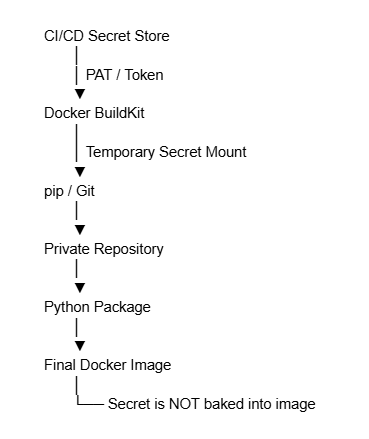
Docker BuildKit supports temporary secret mounts specifically for sensitive information such as authentication tokens. The secret is made available only during the relevant build step.
For example, instead of putting the credential into a Dockerfile ARG, a BuildKit secret can be supplied using:
docker buildx build \
–secret id=repo_token,env=REPO_TOKEN .
The Dockerfile can then consume the secret through a RUN –mount=type=secret instruction.
The exact Git authentication implementation depends on the Git provider and pipeline platform, but the principle remains the same: keep credentials outside source code and expose them only for the operation that needs them.
Best Practices for Private Git Dependencies
1. Keep Credentials Out of Source Control
Never treat requirements.txt as a secure credential store.
Use:
- CI/CD secret variables
- Docker BuildKit secrets
- SSH agent forwarding
- Managed identity or modern workload authentication where supported
2. Use Least Privilege
A build that only needs to read one repository should not have a credential capable of modifying multiple repositories.
Restrict permissions to the smallest practical scope.
3. Monitor Token Expiration
Don’t wait for production builds to discover that authentication has expired.
Azure DevOps supports PAT expiration notifications, while organizations can also establish their own token rotation and monitoring policies.
4. Prefer Modern Authentication Where Possible
Microsoft’s current Azure DevOps guidance increasingly favors Microsoft Entra authentication over higher-risk PAT-based authentication for applicable scenarios. Microsoft describes Entra ID as having native MFA and stronger enterprise policy support, while PATs are described as a maintenance-mode authentication option.
5. Consider a Private Package Registry
If the same Python package is consumed by multiple applications, repeatedly cloning Git repositories may not be the best architecture.
Publishing the package to a controlled internal package registry or artifact feed can simplify:
- Dependency management
- Versioning
- Authentication
- CI/CD configuration
- Rollbacks
- Auditing
This can be particularly useful when pip install private Python packages from Git has become a recurring dependency pattern across multiple projects.
Real-World Example
Consider a company running a Python API in production.
The application uses:
requirements.txt
↓
private-auth-library
↓
Azure DevOps Git repository
The pipeline has successfully built the application for six months.
One morning, the pipeline reports:
pip install -r requirements.txt
ERROR: subprocess-exited-with-error
git clone …
exit code 128
The development team checks the latest commit and finds no relevant changes.
The Dockerfile is unchanged.
The repository still exists.
The investigation reveals that the PAT used to access the private repository has expired.
The immediate fix restores the pipeline. The engineering team then moves the credential into the CI/CD secret store and changes the Docker build to consume it securely.
The result is more than a successful build: the organization removes a recurring secret-management failure from the deployment process.
Pro Tips: Prevent the Next Failure
For production environments, add these checks to your operational checklist:
- Audit all Git URLs containing credentials.
- Review PAT expiration dates regularly.
- Enable expiration and security notifications.
- Use repository-specific, read-only credentials where possible.
- Never use Docker ARG or ENV as a permanent secret store.
- Use BuildKit secret or SSH mounts for build-time credentials.
- Rotate credentials proactively.
- Revoke credentials immediately if they are exposed.
- Evaluate private package feeds for frequently reused Python libraries.
Future Outlook: Moving Beyond Long-Lived PATs
The direction of modern CI/CD security is clear: fewer long-lived credentials and stronger workload identity.
Azure DevOps supports organization policies that can restrict PAT creation, scope, and lifespan, while Microsoft recommends evaluating Microsoft Entra-based authentication for applicable scenarios.
At the Docker layer, BuildKit is also making secret-aware builds a standard capability rather than an afterthought.
For teams operating production Kubernetes, cloud, or DevOps environments, the goal should be to move from:
Hard-coded credential → Expiration → Build failure → Emergency replacement
toward:
Managed secret → Least privilege → Automated rotation → Secure build → Auditable deployment
Final Verdict
A fix git clone exit code 128 in Docker build issue may take only minutes to resolve when the root cause is an expired PAT, but repeatedly fixing the token misses the bigger engineering problem.
If your Docker builds depend on private Git repositories, audit how those credentials are stored and consumed. Move secrets out of dependency files, use secure build-time authentication, restrict repository permissions, and establish proactive credential rotation.
If your team is facing recurring Docker build failures, private repository authentication issues, or insecure Git credentials in CI/CD, a focused DevOps and container-security review can identify the underlying weakness and replace the fragile authentication pattern with a secure, repeatable build architecture.
Frequently Asked Questions
Git clone exit code 128 in Docker builds is commonly caused by authentication or authorization failures. An expired or revoked Personal Access Token (PAT), incorrect repository permissions, or an invalid private Git repository URL can prevent Git from cloning the dependency. To fix Git clone exit code 128 in a Docker build, first verify the private repository URL and check whether the PAT has expired or been revoked. Generate a valid credential with minimum required permissions and configure it securely through your CI/CD secret management instead of storing it in requirements.txt. pip install can fail with Git clone exit code 128 when a private Python package is installed directly from Git and Git cannot authenticate to the repository. Check the Git credentials, repository permissions, PAT expiration, and private package URL used by requirements.txt or pyproject.toml. The recommended approach for private Git repository authentication in Docker is to use CI/CD secrets with Docker BuildKit secret or SSH mounts instead of hard-coded PATs in Dockerfiles, requirements.txt, or environment variables. This prevents credentials from being unnecessarily embedded in Docker images or source control. To fix an Azure DevOps PAT authentication failure in a Docker build, verify that the PAT is valid, has the required repository read permissions, and has not expired or been revoked. For long-term reliability, store the credential in your CI/CD secret manager and use secure build-time authentication.1. What causes Git clone exit code 128 in Docker builds?
2. How do I fix Git clone exit code 128 in a Docker build?
3. Why does pip install fail with Git clone exit code 128?
4. How do I authenticate a private Git repository in Docker securely?
5. How do I fix Azure DevOps PAT authentication failure in a Docker build?