Every leaked AWS access key is a potential security incident.
Hardcoded or long-lived AWS credentials stored in GitHub Secrets remain one of the most common security risks in modern CI/CD pipelines. A compromised repository, accidental log exposure, or unrotated credential can provide attackers with persistent access to your AWS environment. Organizations are increasingly replacing static credentials with identity-based authentication to reduce this risk. The uploaded deployment approach demonstrates how GitHub Actions can authenticate directly with AWS using OpenID Connect (OIDC), eliminating the need to store AWS access keys in GitHub.
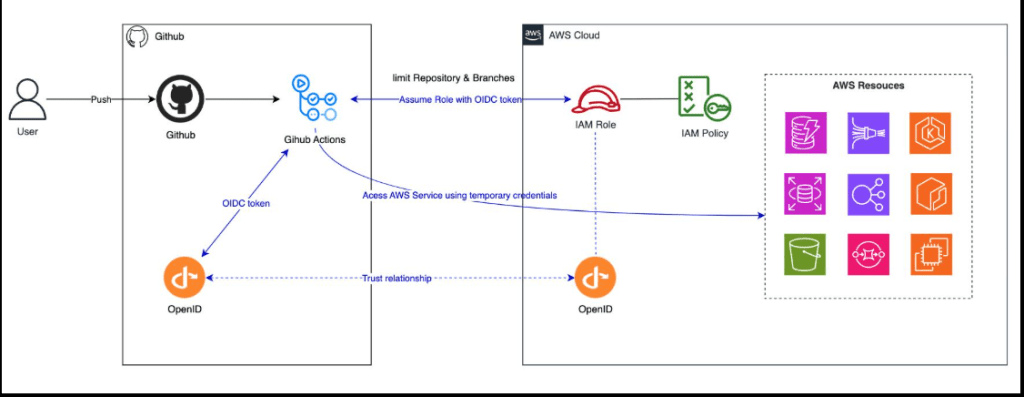
What is GitHub Actions OIDC for AWS?
GitHub Actions OIDC for AWS is a secure authentication method that allows GitHub Actions workflows to obtain temporary AWS credentials using AWS IAM OIDC instead of storing permanent AWS access keys. The workflow proves its identity to AWS, receives short-lived credentials, performs the deployment, and those credentials automatically expire.
This approach strengthens AWS CI/CD Security, follows AWS DevSecOps Best Practices, and enables organizations to Deploy to EC2 without AWS access keys.
Why It Matters
Many DevOps teams still rely on:
- Permanent AWS_ACCESS_KEY_ID
- Permanent AWS_SECRET_ACCESS_KEY
- Shared IAM users
- Long-lived GitHub Secrets
Although convenient, these credentials introduce unnecessary security risks. The uploaded implementation replaces them entirely with temporary credentials obtained during each workflow execution, removing standing AWS credentials from GitHub Secrets.
Common risks include
- Credential leakage through repositories or logs
- Forgotten key rotation
- Excessive IAM permissions
- Increased attack surface
- Compliance challenges
Industry Statistics
Strong authentication practices are becoming essential across cloud environments.
- According to IBM’s Cost of a Data Breach Report, compromised credentials continue to be one of the leading causes of cloud security incidents.
- GitHub recommends using OpenID Connect (OIDC) instead of storing long-lived cloud credentials in GitHub Secrets whenever supported.
- AWS recommends temporary credentials through IAM roles and AWS STS because they automatically expire and follow the principle of least privilege.
These industry recommendations align with the deployment model described in the uploaded guide, where GitHub Actions assumes an IAM role dynamically instead of relying on stored AWS keys.
Why Organizations Are Replacing AWS Access Keys
Modern engineering teams are moving away from static credentials because they improve:
Better Security
Temporary credentials disappear after every workflow execution.
Better Compliance
Identity-based authentication supports Zero Trust and least-privilege security models.
Easier Credential Management
No manual key rotation.
No expired credentials.
No forgotten secrets.
Better Auditability
Every authentication request is logged through AWS IAM and STS.
How GitHub Actions OIDC Works
Instead of storing AWS credentials, GitHub authenticates directly with AWS.
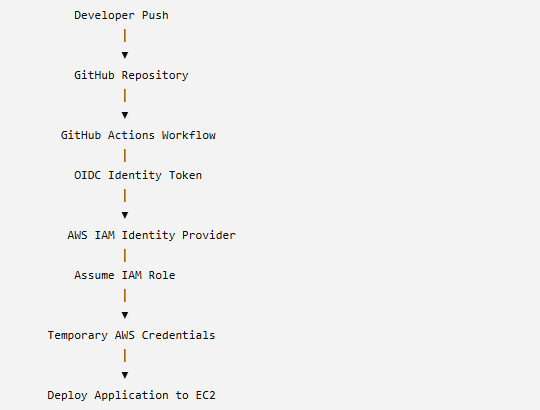
The uploaded workflow follows this exact model by allowing GitHub Actions to request temporary credentials from AWS before deploying to EC2.
GitHub Actions OIDC for AWS EC2 Deployment
Step 1: Configure AWS to Trust GitHub
The first step is creating an OpenID Connect Identity Provider in AWS IAM.
Configuration includes:
- Provider Type: OpenID Connect
- Provider URL:
https://token.actions.githubusercontent.com - Audience:
sts.amazonaws.com
This is a one-time setup per AWS account. Future repositories can reuse the same identity provider while creating separate IAM roles for each project.
Step 2: Create a Dedicated IAM Role
Rather than using a shared IAM user, each repository should have its own IAM role.
The uploaded deployment restricts access so that only a specific repository and branch can assume the role. This significantly reduces the attack surface compared to shared AWS credentials.
Benefits
- Repository-level isolation
- Branch-level restrictions
- Least-privilege permissions
- Temporary authentication
- Improved auditing
This is one of the most effective ways to Replace AWS access keys with OIDC in GitHub Actions.
Step 3: Apply Least-Privilege Permissions
A secure IAM role should receive only the permissions required for deployment.
In the uploaded implementation, the role is limited to:
- Opening SSH (Port 22)
- Closing SSH after deployment
- Accessing only one specific security group
Nothing more.
The guide also notes that AWS Systems Manager (SSM) can provide an even more secure alternative for new deployments by avoiding SSH altogether.
Why This Approach Is More Secure
Compared with traditional deployments, GitHub Actions AWS Authentication through OIDC provides several advantages:
| Traditional AWS Keys | GitHub Actions OIDC |
| Permanent credentials | Temporary credentials |
| Manual rotation | Automatic expiration |
| Shared IAM users | Dedicated IAM roles |
| Higher breach risk | Reduced attack surface |
| Secrets stored in GitHub | No AWS secrets required |
For organizations looking to achieve Secure AWS Deployment, this approach aligns with modern cloud security recommendations and helps reduce operational risk while simplifying credential management.
Step 4: Remove AWS Access Keys from GitHub Secrets
Once GitHub Actions OIDC for AWS EC2 deployment is configured, your GitHub repository no longer needs permanent AWS credentials.
Instead of storing:
- AWS_ACCESS_KEY_ID
- AWS_SECRET_ACCESS_KEY
Your GitHub Secrets only contain deployment-specific information such as:
- EC2_HOST
- EC2_USER
- EC2_SSH_KEY
- EC2_SG_ID
Authentication happens dynamically using the OIDC token generated during workflow execution, eliminating the need for long-lived AWS credentials. This significantly reduces the risk of credential leakage and simplifies secret management.
Step 5: Configure the GitHub Actions Workflow
After AWS IAM OIDC is configured, the deployment workflow becomes straightforward.
The deployment process follows these steps:
- The developer pushes code to GitHub.
- GitHub Actions requests an OIDC identity token.
- AWS verifies the token.
- AWS Security Token Service (STS) issues temporary credentials.
- The workflow temporarily allows SSH access to the EC2 instance.
- The application is deployed.
- SSH access is immediately revoked after deployment.
The uploaded workflow uses the aws-actions/configure-aws-credentials action to assume the IAM role via OIDC, retrieves the runner’s IP address, temporarily authorizes SSH access, performs the deployment, and revokes the security group rule regardless of whether the deployment succeeds or fails.
Example GitHub Actions Configuration
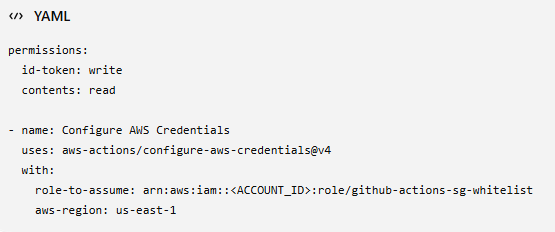
This configuration enables GitHub Actions AWS Authentication using temporary credentials instead of permanent access keys.
Real-World Example
Imagine a SaaS company deploying multiple updates to Amazon EC2 every day.
Traditional Deployment
- AWS credentials stored in GitHub Secrets
- Manual key rotation
- Shared IAM users
- High security risk
- Difficult compliance audits
OIDC-Based Deployment
- No AWS keys stored in GitHub
- Temporary AWS credentials
- Dedicated IAM role per repository
- Automatic credential expiration
- Complete audit trail in AWS
The uploaded deployment guide also recommends creating a dedicated IAM role for each repository while reusing the same OIDC identity provider across the AWS account.
Best Practices for Secure AWS Deployment
To maximize the security of your CI/CD pipeline:
✔ Use Dedicated IAM Roles
Assign a unique IAM role to every repository.
✔ Follow Least Privilege
Grant only the permissions required for deployment.
✔ Restrict Repository Access
Limit role assumption to a specific GitHub organization, repository, and branch.
✔ Prefer Temporary Credentials
Avoid storing AWS credentials in repositories.
✔ Enable CloudTrail Logging
Monitor every authentication request.
✔ Protect GitHub Branches
Use pull request approvals and branch protection rules.
✔ Consider AWS Systems Manager (SSM)
If SSH is unnecessary, use AWS Systems Manager Run Command for an even more secure deployment model, as noted in the uploaded guide.
Common Mistakes to Avoid
Many teams unknowingly weaken their cloud security by making these mistakes:
- Using one IAM user across multiple projects.
- Granting AdministratorAccess to deployment roles.
- Forgetting to restrict IAM trust policies.
- Leaving SSH ports open after deployment.
- Reusing AWS access keys across environments.
- Storing AWS credentials in multiple repositories.
- Ignoring CloudTrail and audit logs.
Avoiding these issues strengthens AWS CI/CD Security and supports long-term operational resilience.
Future of AWS Authentication
Cloud security continues to shift toward identity-based authentication.
Key trends include:
- Passwordless cloud authentication
- Zero Trust security architectures
- Short-lived credentials by default
- Policy-as-Code
- Infrastructure as Code (IaC)
- DevSecOps integrated into CI/CD pipelines
- AI-assisted security monitoring and threat detection
Organizations adopting AWS IAM OIDC today are well positioned for these evolving security practices.
Final Verdict
Replacing static AWS credentials with GitHub Actions OIDC AWS authentication is more than a security improvement; it’s a modern DevSecOps practice that simplifies deployments and reduces operational risk.
By implementing AWS IAM OIDC, you can:
- Eliminate long-lived AWS access keys
- Improve AWS CI/CD Security
- Follow AWS DevSecOps Best Practices
- Enable Secure AWS Deployment
- Reduce credential management overhead
- Strengthen compliance and auditing
For organizations deploying applications to Amazon EC2, adopting OIDC-based authentication is a practical step toward building a more secure and scalable CI/CD pipeline.
Secure Your AWS CI/CD Pipeline with 24×7 Server Management
Your deployment pipeline should accelerate software delivery not introduce security risks.
At 24×7 Server Management, our AWS-certified engineers help organizations design and implement secure, production-ready DevOps environments by:
- Implementing GitHub Actions OIDC AWS authentication
- Securing EC2, ECS, EKS, and hybrid cloud deployments
- Designing least-privilege IAM architectures
- Automating CI/CD pipelines
- Hardening AWS infrastructure
- Providing 24×7 AWS Server Management and proactive monitoring
Whether you’re modernizing an existing deployment process or building a cloud-native platform, we can help you deploy faster while improving security and compliance.
Frequently Asked Questions
GitHub Actions OIDC is an authentication mechanism that enables GitHub workflows to securely access AWS using temporary credentials instead of permanent AWS access keys. OIDC removes long-lived AWS credentials from GitHub, reducing the risk of credential leakage while improving compliance, auditability, and overall cloud security. Yes. By configuring AWS IAM OIDC, GitHub Actions can authenticate directly with AWS using temporary credentials, allowing you to Deploy to AWS EC2 using GitHub Actions without secrets. No. The uploaded guide clarifies that the OIDC IAM role is assumed by the GitHub Actions runner, not by the EC2 instance itself. The EC2 instance can have a separate instance role or none at all depending on its requirements.1. What is GitHub Actions OIDC?
2. Why should I replace AWS access keys with OIDC in GitHub Actions?
3. Can I deploy to EC2 without AWS access keys?
4. Does the IAM role need to be attached to the EC2 instance?